Architecture & extension notes
Working on the codebase
Candidate Finder 2.7 is a CodeIgniter 4 application with no compatibility layer. It uses native routing, the native query builder, native views and native validation, and keeps a small set of application helpers on top.
- CodeIgniter 4.7
- PHP 8.1+
- PSR-4 ·
App\ - No shims
Introduction
The codebase is organised by module. A feature such as departments has a controller, a model, two or three views and one JavaScript file, and the same shape is repeated for every module with few exceptions.
Admin and front-end code are kept apart deliberately. Admin controllers live under the
Admin\ namespace and their models are separate classes from the
candidate-facing ones, so a change to the admin listing cannot unexpectedly alter the
public job board.
Earlier releases were CodeIgniter 3. The compatibility layer used during the
migration has been removed, so there is no get_instance(), no
$this->load, and no $this->input. If you are working from
older documentation, treat any such call as obsolete.
Project structure
The document root must point at public/. The application itself sits one
level above it, outside the web root.
app/, writable/ and vendor/ must not be
reachable over HTTP. The bundled .htaccess blocks them when the
document root cannot be moved; the sample nginx configuration does the same with
root pointed at public/.
Code conventions
These are the conventions the codebase actually follows. Matching them keeps new code indistinguishable from the rest.
Model access
Use the short-name form, as documented in the CI4 user guide:
model('JobModel')->getJob($id);
Do not import models only to write model(JobModel::class), and do not call
model methods statically.
Controllers
$this->request->getPost('x');
$this->request->getGet('x');
$this->request->getFile('x');

return redirect()->to('path');
return $this->response->setJSON($array);
Render a page by composing views, which each return a string:
return view('front/'.viewPrfx().'/layout/header', $pageData)
     . view('front/'.viewPrfx().'/jobs-listing', $data);
Models
$this->db->table('jobs')
    ->select('jobs.*')
    ->where('status', 1)
    ->orderBy('created_at', 'DESC')
    ->limit(10)
    ->get();
Every model extends BaseModel, which extends the framework model and
therefore provides $this->db. Raw SQL is acceptable when the builder
becomes awkward: $this->db->query($sql, $binds).
Views
Escape with esc() and echo pre-built HTML raw. Views are scope-isolated,
so pass data explicitly:
<?= view('path/to/partial', ['x' => $x ?? null]) ?>Routes
All routes are defined in app/Config/Routes.php. They use
$routes->add(), which matches any HTTP verb, because the CI3 application
this replaced did not distinguish verbs.
Admin routes are prefixed with admin/ and grouped near the top of the
file, each protected by the adminauth filter.
$routes->add('admin/jobs', 'Admin\Jobs::index', ['filter' => 'adminauth']);
$routes->add('jobs', 'Pages::jobListing');
$routes->get('uploads/(:any)', 'Files::uploads/$1');The 404 handler must be fully qualified. A short class name throws "Class Pages not found" and turns every missing route into a 500:
$routes->set404Override('\App\Controllers\Pages::notFoundPage');Controllers
Front controllers sit in app/Controllers; admin controllers in
app/Controllers/Admin under the Admin\ namespace.
Both extend BaseController, which loads the shared helpers and provides
the application-level conveniences:
| Method | Purpose |
|---|---|
checkAdminLogin() | Redirects out if no admin session |
checkLogin() | Same, for the candidate area |
xssCleanInput() | Reads request input and strips CSRF fields |
sess() | Session read with a default |
sendEmail() | Sends mail through the configured transport |
ajaxErrorMessage() | Renders an error partial for AJAX responses |
checkIfDemo() | Blocks writes when demo mode is on |
CI3's CSRF layer removed the token from POST before controllers saw it.
CI4 does not. Without stripping, the token lands in a model's
insert() array and produces
"Unknown column 'csrf_token'". Keep that behaviour when adding inputs.
Models
Around forty-five models live in app/Models. Each one extends
BaseModel and declares a table and key:
<?php

namespace App\Models;

class JobModel extends BaseModel
{
    protected $table = 'jobs';
    protected $key   = 'job_id';
}
BaseModel supplies a small set of application helpers on top of the
framework model: xssCleanInput(), emptyObject(),
uniqueSlug(), setSessionValues() and
getSessionValues().
Common result calls
| Call | Returns |
|---|---|
->getResultArray() | Rows as associative arrays |
->getResult() | Rows as objects |
->getRowArray() | A single row as an array |
->getNumRows() | Number of rows |
->insertID() | Last inserted id |
Views & themes
Admin views are in app/Views/admin, one folder per module. Front views are
in app/Views/front/<theme>, with every theme carrying a complete copy
of the front-end view set.
The active theme comes from the current-front-theme setting, resolved by
frontThemeName() and exposed in views as viewPrfx(). A theme
only becomes selectable when both a views folder and an assets folder exist, so a
half-copied theme cannot be activated by accident.
return view('front/'.viewPrfx().'/layout/header', $data)
     . view('front/'.viewPrfx().'/home');
Assets
Static files live in public/assets. Every theme has its own folder and is
self-contained, including its vendored libraries.
The admin-editable stylesheets — theme colours and custom CSS — are stored separately,
under writable/uploads/css/<theme>/, so they survive an update.
The shipped theme stylesheet is always loaded, and the writable copy is layered on top only when it exists. Loading the writable copy alone would permanently shadow the shipped file the first time an administrator saved a setting, and no future theme fix could reach that site.
AJAX and app.js
app.js is the shared wrapper for AJAX requests, form submission, message
display and confirmation dialogs. There are two copies — one for the admin panel and
one for the front end — and they are loaded from the respective footer.
Every module's own JavaScript builds on it, which keeps error handling and messaging consistent across screens.
Response normalisation
CI4's setJSON() sets a JSON content type, so browsers hand the client an
object. The application's JavaScript parses the response as a string, so both
app.js copies normalise it first:
self.response = (typeof data === 'string') ? data : JSON.stringify(data);That line must stay.
Data tables
Listings use the framework's own table handling rather than an external library. A request carries the filters, paging and sort parameters; the controller delegates to the model; the model applies the filters and returns the paged rows; the controller renders them back to the listing partial.
CSRF and validation
CSRF protection is enabled globally for all POST requests. Forms built
with form_open() include the token automatically; AJAX requests read it
from the meta tag in the layout.
Configuration
| Setting | Value | Why |
|---|---|---|
tokenName | csrf_token | Matches the meta tag |
cookieName | csrf_cookie_name | Matches the shipped JavaScript |
regenerate | false | The JavaScript reads the token once per page |
Regenerating the token on every request breaks later AJAX calls on the same page, because the client continues to send the token it read at load time.
Validation
if (! $this->validate($rules)) {
    $errors = $this->validator->getErrors();
}
trim is not a CI4 rule. Flat rule arrays also no longer carry
lang() field labels, so messages name the field itself.
SQL injection and XSS
The query builder binds its values, which prevents injection in ordinary use. When writing raw SQL, always pass bindings rather than concatenating user input:
$this->db->query('SELECT * FROM jobs WHERE status = ?', [1]);
Output is escaped with esc() in views. The legacy
esc_output() wrapper still exists but new code should use
esc() directly.
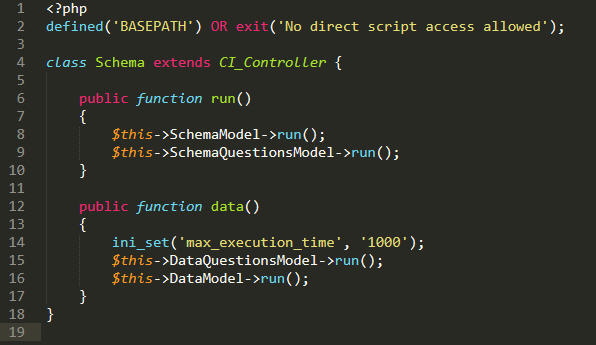
Schema and the updater
There is no .sql file to import. The database structure is defined in
code, in SchemaModel and SchemaQuestionsModel, using the
database forge.
https://www.example.com/schemaThat URL has three jobs. It creates any table or column that is missing, it re-seeds the required rows, and it repairs file storage. It is the supported way to bring an existing installation up to date.
Why re-running is safe
- Tables are created with an existence check, so an existing table is never touched.
- Every late-added column is guarded by a field check before it is added.
- Seed rows are inserted only when the row is absent.
What it reports
The controller snapshots the table and column list before and after the run, then displays the difference: tables created, columns added, and the total number of tables checked. A failure is caught and reported with the changes already applied left in place.
The updater only adds. It cannot drop a column, rename one, change a type or add an index to an existing table. A release that needs any of those must ship a dedicated change rather than relying on the replay.
/schema and /import-data have no authentication. The
first is safe to expose because it is idempotent; the second inserts demo records
and should not be reachable on a live installation.
Demo data
DataModel and DataQuestionsModel insert sample users,
candidates, jobs, blogs, quizzes and interviews so the application can be explored with
realistic content.
https://www.example.com/import-dataThese records are indistinguishable from real ones once inserted, and the route is unauthenticated. Run it on a fresh development copy, never on a live site.
Uploads and storage
User files are written to writable/uploads, outside the web root, and
exposed through public/uploads. Writing to the upload root uses the
UPLOAD_ROOT constant; public URLs use
base_url('uploads/<dir>/<file>').
public/uploads is normally a symlink. Some shared hosts forbid
symlink(), so a route serves the same files directly from
UPLOAD_ROOT when the link is absent. Both paths work; when the link
exists the web server answers first and the route is never reached.
The repair step is careful: an empty public/uploads directory, which
is what an archive unpacks into, is replaced with the link, but a directory that
actually contains files is left untouched.
Rules
- Never write uploads into
public/assets. - Bundled fallback images stay in
assets/images. - Uploads are validated by extension and size, not by trusting the client MIME type.
Translatable content
Records such as jobs, departments, blogs and blog categories carry per-language values
through TranslatableTrait. Each translatable model declares a table and key;
the trait derives a shadow table named <table>_translations.
Reads resolve in order: the active language, then the default language, then the base column on the record. A record with no translations therefore displays its original text rather than an empty field.
$rows = model('JobModel')->translateRows($rows);Lookups for a whole list are batched into a single query rather than one per row.
Installer and .env
The installer is a normal CI4 controller, not a separate script. It is reached at
/install and is the only part of the application that runs before
.env exists.
Steps
- Check the PHP version and required extensions.
- Validate database credentials, then write
.env. - Create the schema and optionally the demo data; link file storage.
- Create the first administrator, then redirect to the admin login.
.env holds both the keys CodeIgniter reads and the application constants:
CI_ENVIRONMENT = production
app.baseURL = 'https://example.com/'
app.indexPage = ''

database.default.hostname = 'localhost'
database.default.database = 'cf'
database.default.username = 'cf'
database.default.password = '...'
database.default.DBPrefix = 'cf_'

CF_BASE_URL = 'https://example.com/'
CF_VIEW = 'classic'
CF_DEMO = falseThe wizard is inert once an administrator exists. The install routes stay excluded from the CSRF and language filters, because on a first run neither a database nor a session is available yet.
Adding a theme
A theme is a complete front-end view set plus its own assets. It is discovered from the filesystem, not registered in configuration.
-
Copy an existing theme's views into
app/Views/front/<theme>/, and make surelayout/header.phpexists — it is what makes the folder count as a theme. -
Add the stylesheet and script set to
public/assets/front/<theme>/. A theme is only selectable when this folder exists. - Keep the front-end JavaScript hook contract used by the other themes, so shared behaviour such as AJAX, filters and validation continues to work unchanged.
-
Add a preview image at
public/assets/front/theme-previews/<theme>.jpgso it displays properly in Settings → Themes.
Nothing needs to be copied into writable/. The colour stylesheet and the
custom stylesheet are created for the new theme the next time /schema runs
or an administrator saves a display setting.
Helper functions
Application helpers live in app/Helpers and are loaded globally, so their
functions are available anywhere.
| Helper | Contains |
|---|---|
functions_helper | Date formatting, string trimming, arrays, encoding, theme resolution, storage helpers |
settings_helper | Singleton access to the settings table |
notifications_helper | Admin and candidate notification creation |
linkedin_helper | LinkedIn sign-in client |
Frequently used functions:
| Function | Returns |
|---|---|
setting('key') | A settings value |
lang('key') | A translated phrase |
viewPrfx() | The active theme name |
encode($id) / decode($id) | Obfuscated identifiers used in URLs |
esc_output($v) | Legacy escape wrapper; prefer esc() |
objToArr($v) | Converts a result object to an array |
External APIs
Google sign-in
The Google client library is installed through Composer, trimmed to the code actually used. Credentials are read from the settings table and the client is built by the base controller.
LinkedIn sign-in
The LinkedIn client is a helper, linkedin_helper.php. Credentials come from
the same settings table.
Both flows are handled in the candidate controller, and both honour a stored return URL so a visitor who was applying for a job lands back on that job after signing in.
Outbound HTTPS
Some servers ship without a CA bundle, which makes outbound cURL requests fail with
error 60. Set CURL_CA_BUNDLE in .env;
remoteRequest() applies it. This affects Google, LinkedIn, reCAPTCHA and
the update check.
Deploying
Two things break more deployments than anything else: the document root and the environment.
Document root
Point the site at public/. On Apache, AllowOverride must be
enabled for the bundled .htaccess to take effect. On nginx, the sample
server block in nginx.conf.example replaces .htaccess
entirely — including a rule that falls back to the front controller for uploads when
the link is absent.
Environment
CI_ENVIRONMENT decides how much detail an error page reveals. Use
development while diagnosing and production otherwise; the
debug toolbar also only appears in development.
CI_ENVIRONMENT = productionPermissions
writable/ and its subfolders must be writable by the web server user.
Nothing else in the tree needs write access.
Checking a deployment
GET  /                    200
GET  /jobs                200
GET  /login               200
GET  /admin/login         200
GET  /account/*           302  (sign-in required)
GET  /schema              200  (after an update)
If a page returns a blank screen or a generic error, read
writable/logs/. The framework logs the full exception there even when the
browser is shown a summary.